Download your free Photoshop logo template. Clean professional logo. Feel free to customize and use it in anyway you like! No attribution required.
Learn how to make this logo from scratch
How to modify logo text
The text hasn’t been created with the traditional Type tool, it’s been created with the Type Mask tool. The following guide will demonstrate how to recreate the text. This is also demonstrated in the video tutorial.
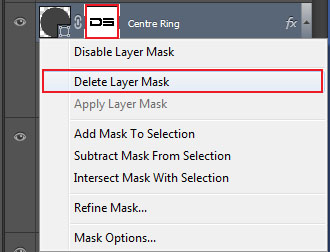
1) Delete the current Layer Mask.
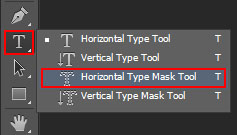
2) To recreate the text, select the Horizontal Type Mask Tool.
3) Click within the canvas, and then format your text appropriately. Make sure that your text extends outward of the centre circle, as we don’t want any cut lines.

4) To convert the text into a selection, press enter.

5) With the Centre Ring selected, hold ALT (or Option on a Mac) and click the Add layer mask button.
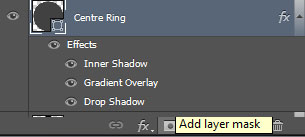
The selection will be removed from the Centre Ring, revealing the background.