Learn to create the Android logo in Photoshop using the shapes tool. This tutorial will teach you the power of shapes and what you can create with them.
Tutorials
Best Vegas Pro Render Settings
This video we take a look at the best Sony Vegas Pro 12 render settings for 720p and 1080p when uploading to YouTube.
YouTube’s Advanced Encoding Settings recommendations: http://goo.gl/VOtAu
Supported OpenCL and CUDA cards: http://goo.gl/8CvU5
Create a Logo in Photoshop
Create a clean & professional logo in Photoshop.
Tutorial notes:
Dodger font: http://www.dafont.com/dodger.font
Template: http://aquul.com/templates/clean-professional-logo/
Create an Epic Intro in Vegas Pro
Learn how to create an epic glitch intro in Vegas Pro! All resources and effects provided.
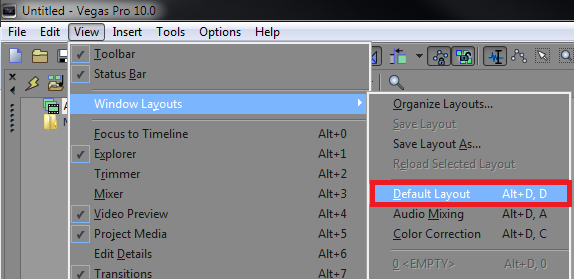
Reset Vegas Pro to Default Layout
Is Vegas Pro being a pain? Reset your Vegas Pro layout back to the default layout to bring back any missing or repositioned windows
In the top left corner navigate to View > Window Layouts > Default Layout. You can also use the shortcut Alt + D.
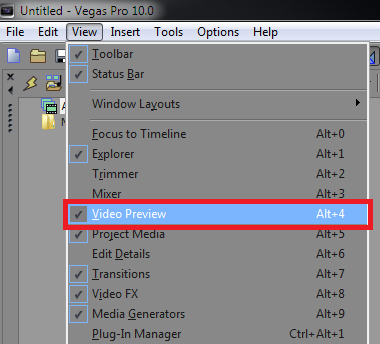
You can also show and hide separate windows in Sony Vegas Pro 10 by checking or unchecking items within the “View” list. For example, hiding the Video Preview window would remove it from the layout.
Group/Ungroup Tracks in Vegas Pro
Learn how to group and ungroup tracks in Sony Vegas Pro. This is especially useful when you’re working with larger projects and is an essential part of workflow optimization.