How to Reset your Sony Vegas Pro Layout and Workspace

45
Posted April 21, 2011 by Corey Harris in Tutorials

A common problem in Sony Vegas Pro 10 is accidentally adjusting the layout when you don’t mean to, and it can seem hard to fix it as you cannot undo the Vegas Pro’s workspace changes with Ctrl + Z.
Here’s a way that should work and reset your Sony Vegas Pro 10 layout back to default.

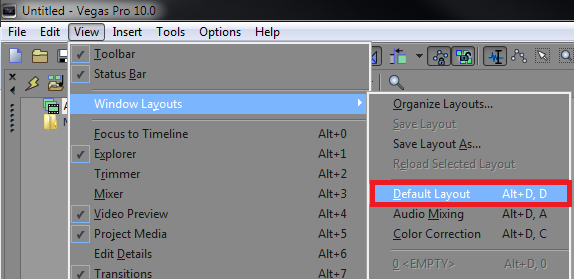
In the top left corner navigate to View > Window Layouts > Default Layout. You can also use the shortcut Alt + D.
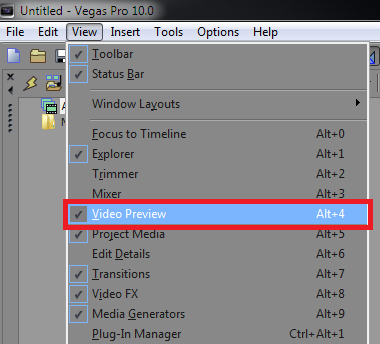
You can also show and hide separate windows in Sony Vegas Pro 10 by checking or unchecking items within the “View” list. For example hiding the Video Preview window would remove it from the .


If you have any questions feel free to ask them in the comment section below


About the Author

Corey Harris

Corey is a 16 year old video editor and graphic designer. He has been creating tutorials on YouTube for over 2 years now. Through AquuL.com, Corey provides video tutorials and templates for Sony Vegas and Adobe Photoshop.

  • Saurav Mishra

    Thank you sir your epic glitch tutorial helped me a lot…as you said in the video that send me some video response so that i could see your video…help me anyone i dont know how to send video response…i forgot…anyways i got a new idea to make my new intro…and “AQUUL” pls can i also make a tutorial on my channel…using your backround or audio?i will write in the video description that the audio is by aquul…blabla…and here is the original epic glith tuto…- (link) pls can i make?

  • http://www.facebook.com/baronbasit Abdul Basit

    I have a  problem My Other windows doesnot pops out

    • AquuL

      When starting Sony Vegas, try and hold CTRL + SHIFT, you should get a little dialogue box up. Click Yes, and it will reset your Sony Vegas settings.

  • Jay

    Aquul, please help me with the video preview window, I cannot see the video FX im putting on a certain slide, only I can see the FX when I render the video.

  • Aaron

    How do I reset the little windows that pop-up? Like I went to move my Text Media Generator Pop-Up window and it went into another window and I can’t move it anymore? Any help?